Coming November 13, 2026
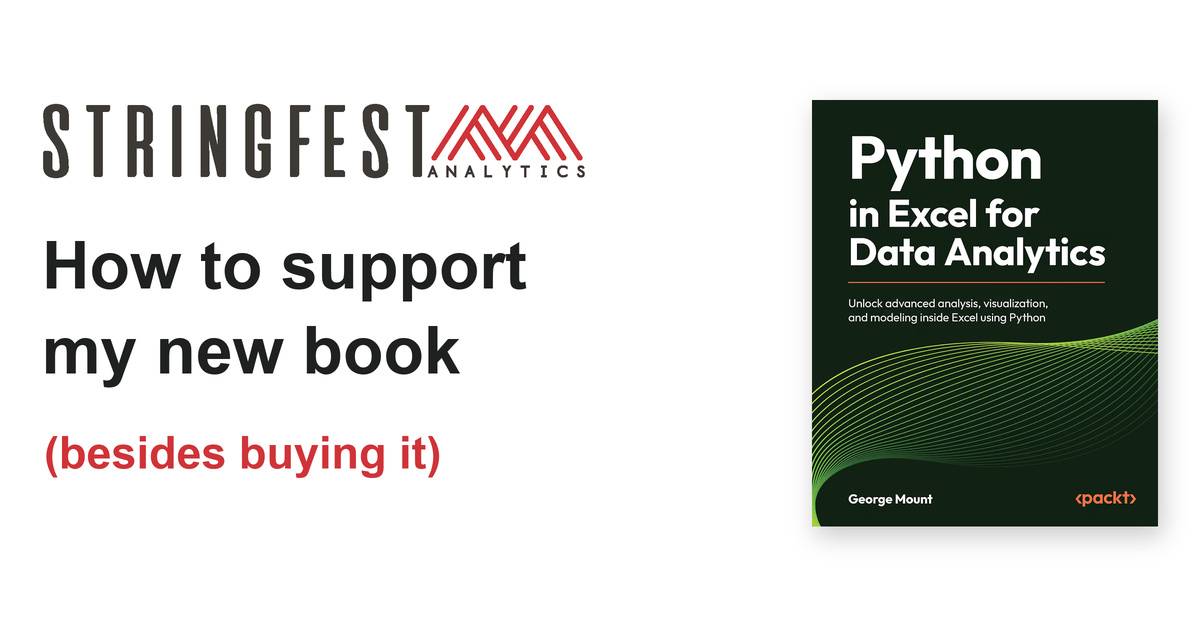
My new book, Python in Excel for Data Analytics, is almost here, and I'd love your help getting it into the hands of people who want to do more with the spreadsheet they already know.

Writing a book involves plenty of time alone with a manuscript. Helping people discover it is much more of a group project. When Modern Data Analytics in Excel came out, I shared several ways to support the book besides buying it. I'm bringing that idea back, starting with my favorite: ask your library for a copy.
The new book is for Excel users who want to add Python to their analytical toolkit, with practical work on cleaning data, visualization, statistical analysis, forecasting, and simulation. You don't need prior programming experience. And you don't need to buy a personal copy to help it find its readers.
1. Ask your library to order it
A library copy can introduce the book to someone who might never have found it otherwise, then keep doing that for the next borrower. That sounds like an excellent arrangement to me.
Start by searching your library's catalog for the title or ISBN. If it isn't there, look for a "Suggest a purchase," "Recommend a title," or "Materials request" form. A web search for your library's name plus "suggest a purchase" can help you find it, or you can simply ask a librarian. Public, university, and workplace libraries may have different processes, so use whichever applies to you.
Here are the paperback details to copy into the request:
Book details
Python in Excel for Data Analytics
Unlock advanced analysis, visualization, and modeling inside Excel using Python
George Mount
Packt Publishing
Paperback ISBN-13
9781806696352
ISBN-10: 1806696355
Publication date:
November 13, 2026
A request you can adapt
I'd like to suggest Python in Excel for Data Analytics by George Mount (Packt Publishing; paperback ISBN 9781806696352) for the collection. It is a practical guide for Excel users who want to learn data cleaning, visualization, and analytical modeling with Python inside Excel. It could be useful to readers who use spreadsheets for business, finance, or operations work.
Libraries make their own purchasing decisions, and some may ask you to wait until a forthcoming book is released. If the book is already in the catalog, placing a hold is a good next step. You can also ask whether borrowing it from another library is an option.
I called this the "library loophole" in the earlier post, but there's nothing sneaky about it. I want people to read the book. A copy that makes its way through a community is very much part of the plan.
2. Invite me to your meetup, livestream, or learning event
Do you help organize an Excel, analytics, Python, finance, or business intelligence group? I'd love to talk about a session that helps your audience put Python in Excel to work.
That could be an online meetup with a demo and discussion, a shorter appearance on a YouTube or LinkedIn livestream, or an event at your workplace, school, or library. Libraries often bring authors in for talks, and a practical session on spreadsheet analysis can fit a learning program just as well as a traditional author reading. I promise not to spend an hour reading Python code aloud.
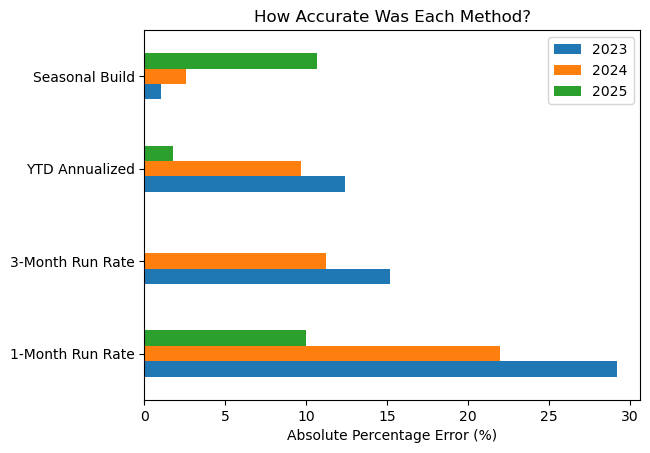
The topic should start with what your group actually does. We could discuss cleaning a messy dataset, making a chart that explains a pattern, or testing an assumption behind a forecast. For a sense of the approach, my post on building a better run rate analysis with Python in Excel compares familiar forecasting shortcuts against what happened in prior periods. It gives us something more useful to discuss than whether the latest month times 12 "feels about right."
From the Python in Excel archive
Build a better run rate analysis
Which forecasting shortcut actually works best? This walkthrough tests four run-rate methods against prior years so there is evidence behind the answer.
If you have an audience or an event in mind, get in touch with a little about the group, the format, and what you would like people to take away. We can work out a good fit from there. For virtual events, the commute is easy; snacks remain a local responsibility.
3. Share it through a podcast, blog, or social post
A live event isn't the only way to help. If you host a podcast, I'd be happy to explore a conversation about what Python adds to Excel, how spreadsheet users can approach programming, or how to decide when a more advanced analytical method is worth the effort. We can have that conversation without asking listeners to picture a 40-line script while they walk the dog.
If you write a blog or newsletter, a guest post, interview, or collaboration could be another way to introduce the book to your readers. You're also welcome to pass along a relevant article of mine with a note about why it caught your attention.
On social media, sharing a book-related post, adding a useful comment, or mentioning it to a colleague can help the right person find it. A specific connection is especially helpful: perhaps someone on your team has been curious about Python but wants to keep working in Excel. You don't need a large audience for that recommendation to matter.
For example, my survival analysis walkthrough starts with a familiar business question: how long do customers take to pay? If that is a question someone in your network wrestles with, the article gives you a useful place to start the conversation.

From the Python in Excel archive
Find out how long customers take to pay
An average of paid invoices leaves out the ones still waiting for payment. Survival analysis gives those unfinished stories a place in the analysis.
You can share the Amazon listing or this post. And if your post encourages someone to request a library copy, you've managed two of these suggestions at once. Efficient work; I approve.
4. Leave an honest review after you've read it
Once you've spent time with the book, an honest review can help the next reader decide whether it is right for them. You don't need to write a second book about the first one; a short paragraph about your experience is plenty.
Build your review one sentence at a time
If you're not sure what to include, these five questions give you a structure. Aim for roughly one sentence per question, combining answers where it feels natural:
- What was your starting point? Briefly describe what you use Excel for and how much Python experience you had.
- Which part of the book did you spend time with? Name a chapter, technique, or worked example that stood out.
- What did you take away from it? Describe something you learned, a task you tried, or a point where you got stuck.
- How did the explanations fit your experience level? Comment on the pace, detail, or assumed background, with a specific reason.
- Who would you recommend it to? Describe the reader you have in mind and why the book would or would not suit them.
A starting point you can adapt
I use Excel for [your work or studies], and before reading this book I had [your level of Python experience]. I spent time with [a specific chapter, technique, or example], which [what you learned, accomplished, or found difficult]. The explanations were [your assessment of the pace or detail] because [a specific reason]. I would [recommend / not recommend] this book to [a particular kind of reader] because [why].
A specific suggestion, such as wanting more detail on a particular topic, is useful too. If you worked through only part of the book, mentioning that gives readers helpful context. The goal is to describe your experience candidly, in your own voice.
When reviews are available, you can leave yours on the book's Amazon page. You can also send me your feedback directly; I appreciate hearing what worked for you and what could be clearer.
Thanks for helping the book find its readers
Whether you request a library copy, introduce me to an event organizer, share a link, or eventually leave a review, I appreciate it. These are all ways to connect the book with people who could use it.
If you'd like one small thing to do now, look up the book in your library's catalog and submit a purchase suggestion if it isn't there. And if you would like a copy for your own shelf, you can pre-order it here. Thank you for being part of this one.